A receipt, in a few taps.
Scan multiple pages, choose receipt photos, or type in the details. You enter the merchant, date and optional amount, so you stay in control.
For the things you buy and the moments you need proof. Save a receipt on your iPhone, find it later, and take your records with you.
Coming soon to the App Store · Free to start
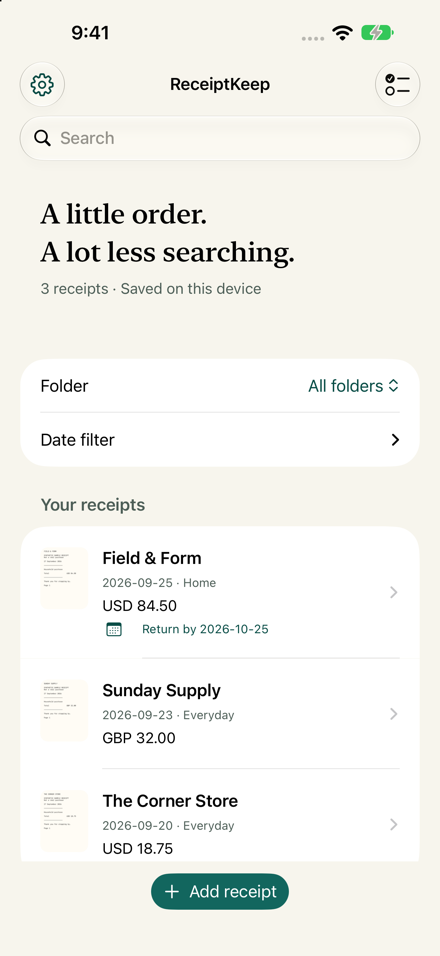
App screenshot · Sample receipts
A small, straightforward tool for returns, reimbursements, and the everyday purchases worth keeping track of.
Scan multiple pages, choose receipt photos, or type in the details. You enter the merchant, date and optional amount, so you stay in control.
Search merchants and notes, organize into folders, or filter by purchase date. Keep the original pages alongside your details.
Share selected receipts as readable PDFs or CSV files. Create a full backup with the original images to restore your library later.
No account. No ads. No analytics. Receipt details and images are stored locally, with no developer server or cloud AI.
Apple handles purchases. You choose where exports go. Device backups follow your Apple settings. Deleting the app deletes its receipts, so keep a full backup.
Read the privacy details ↗Free to download, with room for 25 receipts. A one-time $4.99 unlock removes the 25-receipt limit for good. No subscription, ever.
Export, backup, folders and return reminders are free for everyone. Purchases are handled by Apple and can be restored on any device signed in to your Apple Account. Price shown in US dollars; it may vary by region.
No. Receipt Sleeve keeps the original pages and lets you enter the details. It does not offer OCR, AI extraction, bank connections or email scanning.
You enter a return date and choose whether to receive a local alert at 9 AM. Receipt Sleeve does not check retailer policies. Permission, Focus and device notification settings affect delivery.
Yes, using a full backup file. There is no automatic cloud sync. Restoring a backup replaces the current library after validation. A PDF or CSV export is not a full backup.
Receipt Sleeve is coming soon to the App Store for iPhone. It is free to download and includes 25 receipts. A one-time $4.99 unlock removes the limit.